NinjaTrader Support Forum  
X

Attention!

This website will be down for maintenance from Friday May 24th at 6PM MDT until Saturday May 25th at 11AM MDT. We apologize for the inconvenience. If you need assistance during this time, please email sales@ninjatrader.com


Go Back   NinjaTrader Support Forum > Application Technical Support > Strategy Analyzer

Strategy Analyzer Support for automated system backtesting and optimization using the NinjaTrader Strategy Analyzer.

Reply
 
Thread Tools Display Modes
Old 07-19-2012, 10:03 AM   #1
vitaliys
Junior Member
 
Join Date: Jan 2012
Posts: 17
Thanks: 0
Thanked 0 times in 0 posts
Default Strategy Analizer questions

Hello, I was looking through the help guide but I could not find an answer to my questions and if you could provide some information that would be great.

1) During strategy optimization how does the data being fed into the strategy ? At the bar closure or tick by tick?

2) During strategy optimization is it possible to set execution for all posible combination in the data ranges provided?

Thanks a lot,
vitaliys is offline  
Reply With Quote
Old 07-19-2012, 10:07 AM   #2
NinjaTrader_Matthew
NinjaTrader Customer Service
 
NinjaTrader_Matthew's Avatar
 
Join Date: Apr 2010
Location: Denver, CO, USA
Posts: 4,790
Thanks: 160
Thanked 567 times in 558 posts
Default

Hello,

1) When backtesting/optimization the events will be evaluated at the close of each bar. Please review our Help Guide article on Discrepancies: Real-Time vs Backtest

http://www.ninjatrader.com/support/h...ime_vs_bac.htm

2) Can you elaborate on this? Do you mean to optimize on tick vs minute vs range, etc? Or do you just want to run on range of values? (e.g., 1 minute to 60 minute)
NinjaTrader_Matthew is online now  
Reply With Quote
Old 07-19-2012, 10:17 AM   #3
vitaliys
Junior Member
 
Join Date: Jan 2012
Posts: 17
Thanks: 0
Thanked 0 times in 0 posts
Default

Thanks for the reply, I read that optimization does not go through all the values that you set in ranges to optimize strategy on, it picks patherns to achive the most for selected type of otpimization. So I was woundering if there is a setting to run optimization for all possible combinations in the ranges that you give to the strategy input fiels.
vitaliys is offline  
Reply With Quote
Old 07-19-2012, 11:08 AM   #4
NinjaTrader_Matthew
NinjaTrader Customer Service
 
NinjaTrader_Matthew's Avatar
 
Join Date: Apr 2010
Location: Denver, CO, USA
Posts: 4,790
Thanks: 160
Thanked 567 times in 558 posts
Default

Hello,

It will only pick patterns if you're using the genetic optimization.

The standard optimization will be fully exhaustive and optimize on all possible combinations.
NinjaTrader_Matthew is online now  
Reply With Quote
Old 08-16-2012, 07:58 PM   #5
vitaliys
Junior Member
 
Join Date: Jan 2012
Posts: 17
Thanks: 0
Thanked 0 times in 0 posts
Default

Thank you for your reply, it really helped me to optimize my code for the "last tick in bar" order handling.

I was wondering how the strategy execution is different in the Strategy Analyzer vs running it manually in terms of internal functions being executed by that I mean:

1) when the Analyzer moves to the next value in data range what functions are being triggered in the strategy ? Same as if it would be added to the chart and enabled ?

Initialize() >OnStartUp()>OnBarUpdate() ? Or the Strategy Analyzer skips some of it when looping through the values ?
vitaliys is offline  
Reply With Quote
Old 08-17-2012, 07:34 AM   #6
NinjaTrader_PatrickH
NinjaTrader Customer Service
 
NinjaTrader_PatrickH's Avatar
 
Join Date: Jul 2011
Location: Denver, CO, USA
Posts: 1,694
Thanks: 116
Thanked 193 times in 188 posts
Default

Hello vitaliys,

Thank you for your response.

The Initialize(), OnStartUp(), and OnBarUpdate() methods will work the same on both real-time data and the Strategy Analyzer. The only difference here is you must remember that Backtesting always runs as CalculateOnBarClose = True, which means OnBarUpdate() is called on the close of a bar.

For information on the Initialize(), OnStartUp(), and OnBarUpdate() methods please visit the following links:

For information on CalculateOnBarClose pelase visit the following link: http://www.ninjatrader.com/support/h...onbarclose.htm

Please let me know if I may be of further assistance.
NinjaTrader_PatrickH is offline  
Reply With Quote
Old 08-19-2012, 09:59 PM   #7
vitaliys
Junior Member
 
Join Date: Jan 2012
Posts: 17
Thanks: 0
Thanked 0 times in 0 posts
Default

Thanks ! running smoothly,! could you take a look at the screenshot below, it looks like the application is not using a lot of CPU but using a lot of RAM. Is there any way to make it run faster? I already set the process priority to "High" I'm running optimization on 18 day period but with quite a lot of parameters. Not sure if its hanging or not, Control Centre's window is greyd out as you can see in the background.
Attached Images
File Type: jpg optimizer.jpg (729.7 KB, 10 views)
Last edited by vitaliys; 08-19-2012 at 10:01 PM.
vitaliys is offline  
Reply With Quote
Old 08-20-2012, 07:11 AM   #8
NinjaTrader_PatrickH
NinjaTrader Customer Service
 
NinjaTrader_PatrickH's Avatar
 
Join Date: Jul 2011
Location: Denver, CO, USA
Posts: 1,694
Thanks: 116
Thanked 193 times in 188 posts
Default

Hello vitaliys,

Thank you for your post.

You can find performance tips for the NinjaTrader 7 platform at the following link: http://www.ninjatrader.com/support/h...ance_tips2.htm

So I may investigate this matter further please send me your log and trace files to support[at]ninjatrader[dot]com for today so that I may look into what occurred. In addition, please advise how many Workspaces you have open and the size of your database file which can be found by going to Documents-->NinjaTrader 7-->db folder and the database will be named "NinjaTrader.sdf".

You can send your log and trace files by going to the Control Center-> Help-> Mail to Support.

Please reference this thread in the body of your e-mail: http://www.ninjatrader.com/support/f...ad.php?t=51300
And include "ATTN: Patrick" in the subject line.

I look forward to assisting you further.
Last edited by NinjaTrader_PatrickH; 08-20-2012 at 07:38 AM.
NinjaTrader_PatrickH is offline  
Reply With Quote
Old 08-20-2012, 08:33 AM   #9
vitaliys
Junior Member
 
Join Date: Jan 2012
Posts: 17
Thanks: 0
Thanked 0 times in 0 posts
Default

Thanks Patrick for the support, I think I found two issues with my code, first I compiled it in Debug mode and second I need to put condition on the Print statements so I could turn it off for the optimization runs so it wouldn't consume CPU on logging messages. Let me do these changes and I will update on the results.

Is there a function to save "Optimization Template" with optimization values ?

Update: I have excluded pint function from the code with condition and disabled the debugging mode, see the screenshot for the details. I see more CPU activity going through as well as activity in page file, its ranging from 700mb - 1.6GB. DB file size is about 6 mb but time stamp in "modified date" field is not changing during the test and "Control Center" window looks greyed out not sure if its normal.
Attached Images
File Type: jpg optimizer1.jpg (315.0 KB, 1 views)
Last edited by vitaliys; 08-20-2012 at 10:32 AM.
vitaliys is offline  
Reply With Quote
Old 08-20-2012, 10:28 AM   #10
SharonSS
Member
 
Join Date: Feb 2009
Posts: 77
Thanks: 27
Thanked 3 times in 3 posts
Default

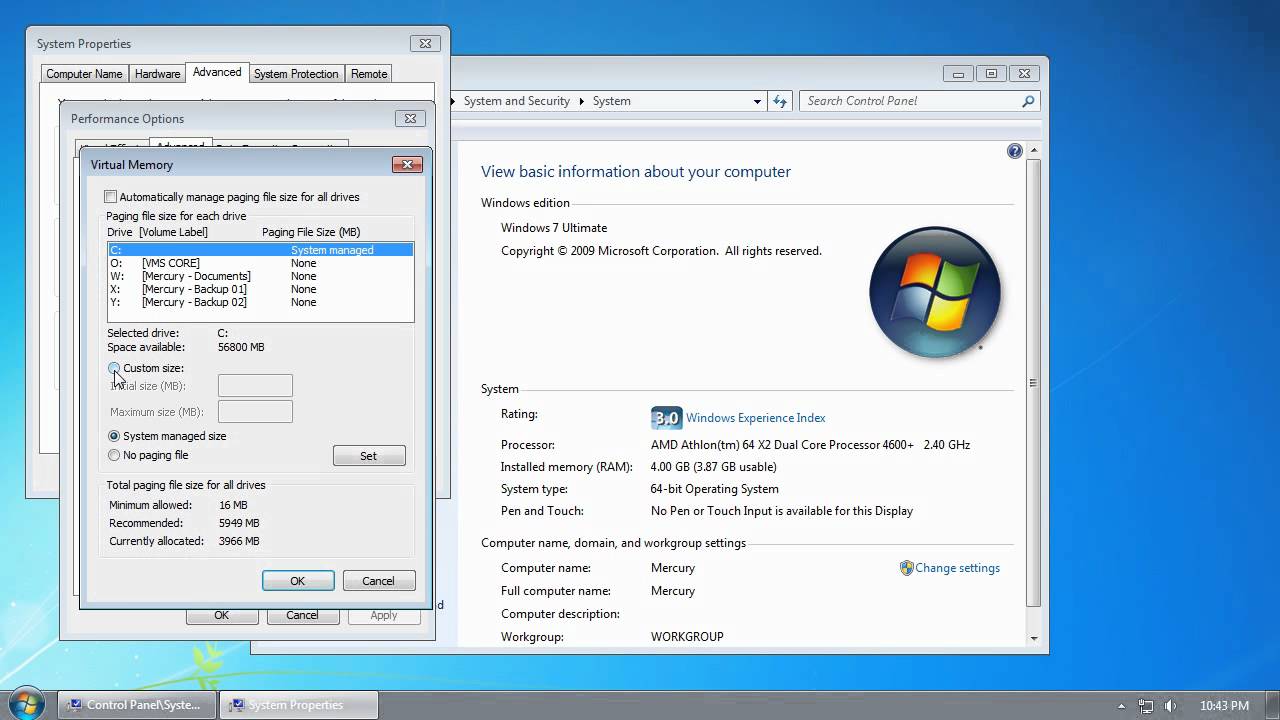
Don't know if this will help as you seem to have found a few things to help your high ram, but here is an awesome video that someone posted on another thread to eliminate that issue.

http://www.youtube.com/watch?v=DWCVhk5gTps

Thanks to the person who posted this as I certainly didn't know anything about setting Vitual Memory.

Good luck.
SharonSS is offline  
Reply With Quote
Old 08-20-2012, 10:44 AM   #11
vitaliys
Junior Member
 
Join Date: Jan 2012
Posts: 17
Thanks: 0
Thanked 0 times in 0 posts
Default

Thanks for the link, I already changed my page file settings, since my 16GB of ram wasn't enough and the windows would shut down NinjaTrader due to lack of RAM lol. Please see my previous post for the updates. I can't get to the Control Center menu to get the logs.

my system configuration
16GB DDR3 2133
CPU i7-3930k
SSD system drive

Win7 Sp1 64 bits,
Running NinjaTrader 64 bits
Last edited by vitaliys; 08-20-2012 at 10:50 AM.
vitaliys is offline  
Reply With Quote
Old 08-20-2012, 10:53 AM   #12
NinjaTrader_PatrickH
NinjaTrader Customer Service
 
NinjaTrader_PatrickH's Avatar
 
Join Date: Jul 2011
Location: Denver, CO, USA
Posts: 1,694
Thanks: 116
Thanked 193 times in 188 posts
Default

Hello vitaliys,

Thank you for your response.

Your database is about average in size. Please manually attach your log and trace files to your response and please advise how many Workspaces you have open.

You will find the log file on your PC in the (My) Documents > NinjaTrader 7 > Log folder.
  • The log file will be named "log.20120820.txt"
You will find the trace file on your PC in the (My) Documents > NinjaTrader 7 > Trace folder.
  • The trace file will be named "trace.20120820.txt"
Please send your e-mail to support[at]ninjatrader[dot]com with your log and trace files attached.
Please reference this thread in your e-mail: http://www.ninjatrader.com/support/f...ad.php?t=51300
Please also place "ATTN: Patrick" in the subject line.

I look forward to assisting you further.
NinjaTrader_PatrickH is offline  
Reply With Quote
Old 08-25-2012, 07:51 AM   #13
ggeib750
Member
 
Join Date: Jul 2011
Location: France
Posts: 34
Thanks: 3
Thanked 0 times in 0 posts
Default

Concerning this statement :

"
The Initialize(), OnStartUp(), and OnBarUpdate() methods will work the same on both real-time data and the Strategy Analyzer. The only difference here is you must remember that Backtesting always runs as CalculateOnBarClose = True, which means OnBarUpdate() is called on the close of a bar.
"

Does it mean that the Strategy Analyser can work with a strategy with CalculateOnBarClose =False , meaning that OnBarUpdate() is called on the close of the bar ( as if CalculateOnBarClose =True) ?

Regards
ggeib750 is offline  
Reply With Quote
Old 08-26-2012, 03:05 PM   #14
NinjaTrader_AdamP
NinjaTrader Customer Service
 
NinjaTrader_AdamP's Avatar
 
Join Date: Aug 2011
Location: Denver, CO, USA
Posts: 2,895
Thanks: 241
Thanked 375 times in 365 posts
Default

Ggeib,

That is correct.

You can add intrabar granularity to backtests using the following : http://www.ninjatrader.com/support/f...ead.php?t=6652
NinjaTrader_AdamP is offline  
Reply With Quote
Old 08-26-2012, 09:15 PM   #15
vitaliys
Junior Member
 
Join Date: Jan 2012
Posts: 17
Thanks: 0
Thanked 0 times in 0 posts
Default

My whole code was built with the idea of CalculateOnBarClose = True calculations, but it looks like Market Position does not go flat after ExitLong(); command , at least not right away it looks like it goes through all code , so to say finished all actions and only then renders market position flat state on the OnBarUpdate() event during historical calculations after I added condition to check that the market state is flat I got rid of all the error messages , but can't reverse now on the same bar.
vitaliys is offline  
Reply With Quote
Reply

Thread Tools
Display Modes

Posting Rules
You may not post new threads
You may not post replies
You may not post attachments
You may not edit your posts

BB code is On
Smilies are On
[IMG] code is On
HTML code is Off

Forum Jump

Similar Threads
Thread Thread Starter Forum Replies Last Post
Strategy Analizer at least 4 years dubaigoldholding Strategy Analyzer 11 07-25-2012 10:02 AM
How to use correct Bid and Ask rates in Strategy Analizer? topor Strategy Analyzer 5 06-01-2012 02:23 AM
EnterLongLimit and Strategy Analizer alibanez Automated Trading 1 04-28-2011 02:42 PM
Strategy analizer bugs Baruch Version 7 Beta General Questions & Bug Reports 2 12-04-2009 02:08 AM
First Aid on Strategy Analizer Janos Strategy Analyzer 3 11-08-2009 05:36 PM


All times are GMT -6. The time now is 02:20 PM.